
Giáo án Tiếng Anh 8 - Tiết 95 (Bản đẹp 3 cột)


Bạn đang xem tài liệu "Giáo án Tiếng Anh 8 - Tiết 95 (Bản đẹp 3 cột)", để tải tài liệu gốc về máy bạn click vào nút DOWNLOAD ở trên
Period 95
UNIT 15 COMPUTERS
Lesson 4 Write
Objective : By the end of the lesson, Students will be able to write a set of instructions on how to use the printer .
Materials : posters,
Procedure :
Timing
Contents
Teacher and Students’ activities.
3
 Printer à Pietrnr
 Screen à Snerec
 Store à Soter
 Monitor à Miroton PRINTER
 Mouse à Muoes
I. Warmer :
 Jumbled words
 Hang man
15’
Today we will learn how to write the instructions on how to use the printer.
à New words :
 - paper input tray (n) khay đưa giấy vào
 - monitor screen (n) màn hình
 - power button(n) nút mở điện
 - icon (n) ký hiệu
 - output path (n) lối ra
 - flash (v) lóe sáng
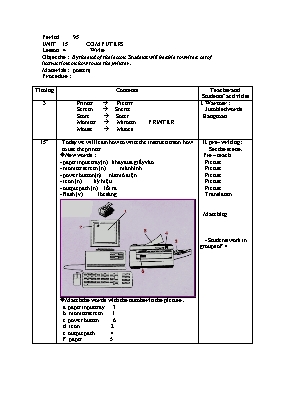
à Match the words with the number in the picture .
 a. paper input tray 3
 b. monitor screen 1
 c. power button 6
 d. icon 2
 e. output path 4
 f. paper 5
 II. pre- writing :
 Set the scene .
 Pre – teach
 Picture
 Picture
 Picture
 Picture
 Picture
 Translation
 Matching
 - Students work in groups of 4
18
àWrite the instructions on how to use the printer.
Plug / printer and turn / power .
Remove / old paper and load / new paper / paper input tray .
Wait / power button / flash.
Have the pages/ appear /computer screen.
Click / printer icon /screen and wait /a few seconds.
The printed paper / will come t/ of the output path /a minute .
III.While writing :
- Teacher gives feedback.
Write it up
 - students work individually .
7
1. Plug in the printer and turn on the power .
2. Remove the old paper and load the new paper in the paper input tray .
Wait for the power button to flash.
Have the pages appear on the computer screen.
Click the printer icon on the screen and wait for a few seconds.
 6. The printed paper will get out from the output path in a minute .
IV. Post – writing :
 Correction
2
Learn new words by heart .
Prepare lesson 5 . Language focus p.135 ( present perfect )
V. Homework :
Tài liệu đính kèm:
 giao_an_tieng_anh_8_tiet_95_ban_dep_3_cot.doc
Đề thi liên quan
 Đề kiểm tra một tiết số 3 Tiếng anh lớp 8 - Trường THCS Trần Phú
 Lượt xem: 898
 Lượt tải: 0
 Đề kiểm tra học kỳ I môn Tiếng Anh Lớp 8 - Năm học 2014-2015 - Phòng GD & ĐT Châu Thành (Có đáp án)
Lượt xem: 587
Lượt tải: 0
Đề kiểm tra học kỳ I môn Tiếng Anh Lớp 8 - Năm học 2014-2015 - Phòng GD & ĐT Châu Thành (Có đáp án)
Lượt xem: 587
Lượt tải: 0 40 Bài tập thì Tương lai đơn và Tương lai gần trong tiếng Anh
Lượt xem: 1005
Lượt tải: 0
40 Bài tập thì Tương lai đơn và Tương lai gần trong tiếng Anh
Lượt xem: 1005
Lượt tải: 0- Đề kiểm tra học kì I môn Tiếng anh lớp 8 - Đề số 13
Lượt xem: 802
Lượt tải: 0
- Bài tập ôn luyện ngữ pháp Tiếng anh lớp 8
Lượt xem: 995
Lượt tải: 1
- Đề kiểm tra 45 phút số 2 môn Tiếng Anh Lớp 8 (Thí điểm) (Có đáp án)
Lượt xem: 820
Lượt tải: 0
- Đề kiểm tra 15 phút môn Tiếng Anh Lớp 8 - Trường THCS Trần Phú
Lượt xem: 680
Lượt tải: 0
- Đề kiểm tra 1 tiết môn Tiếng Anh Lớp 8
Lượt xem: 263
Lượt tải: 0
- Đề thi học kỳ II môn Tiếng Anh 8 - Năm học 2017-2018
Lượt xem: 77
Lượt tải: 0
- Kiểm tra 1 tiết môn: Hình lớp 7
Lượt xem: 1337
Lượt tải: 0
Copyright © 2026 ThuVienDeThi.com, Thư viện đề thi mới nhất, Đề kiểm tra, Đề thi thử

